Robot Operating System (ROS)
Links
Introduction
Set of software libraries and tools that help build robot applications. It is an open-source, meta-operating system for the robot. It provides the services expected from an OS, including:
- hardware abstraction,
- low-level device control,
- implementation of commonly-used functionality,
- message-passing between processes, and
- package management.
As of now, it primarily runs only on Unix platforms, though as of ROS 2 it is also available in windows.
ROS 1 vs ROS 2
Access reference for ROS 1 and ROS 2
Differences
- Introduction and Legacy
- ROS 1: First version, introduced in 2007. Used in academia and hobbyist projects.
- ROS 2: Launched in 2017 as an overhaul of ROS 1.
- Communication Infrastructure
- ROS 1: Master-slave architecture with ROS Master.
- ROS 2: Distributed graph architecture without central master.
- Networking and Security
- Limited networking features. Not security-focused.
- Enhanced networking with DDS support. Built-in security features.
- Real-Time Support
- Limited support for real-time processes.
- Improved real-time computing support.
- Client Libraries and Languages
- Primarily supports C++ and Python.
- Supports more languages; modular architecture.
- Community and Ecosystem
- Large community with many packages and tools. Focus shifting to ROS 2.
- Growing community; ongoing development for robustness and enterprise features.
Key Considerations
- Legacy vs. Modern Requirements - ROS 1 is suitable for educational and research projects, while ROS 2 caters to modern, industrial, and secure applications.
- Community and Support - ROS 1 has a larger existing base of packages and community support, but ROS 2 is rapidly catching up and is the focus of future development.
- Application Needs - For advanced networking, security, or real-time requirements, ROS 2 is the preferred choice.
Bottomline
The key difference can be narrowed down to the way in which the communication between nodes is facilitated in the two different systems. ROS 1 uses TCP/IP primarily while ROS 2 uses DDS. The links will expound on this implementation in more detail.
Distributions
As of writing this (Jan 11, 2024), these are the available distros for ROS.
ROS 1
| ROS Version | Release Date | EOL Date | Remarks |
|---|---|---|---|
| Noetic Ninjemys | May, 2020 | May, 2025 | Latest LTS for ROS 1 (supperted in Ubuntu 20.04) |
| Melodic Morenia | May, 2018 | June, 2023 | - |
| Lunar Loggerhead | May, 2017 | May, 2019 | - |
ROS 2
| ROS Version | Release Date | EOL Date | Remarks |
|---|---|---|---|
| Humble Hawksbill | May, 2022 | May, 2027 | LTS for ROS 2 (supported in Ubuntu 22.04) |
| Iron | May, 2023 | Nov, 2024 | Latest Stable for ROS 2 |
| Rolling Ridley | June, 2020 | - | Development Distro for ROS 2 |
Basics
Nodes, Topics and Messages
The three main components of any ROS network is the ROS node, topic and message.
- A Node is like a component of any robotic system that does something. It is an executable that performs a specific task. One of the main functions of a node in any ROS network is to publish or subscribe data.
- A Topic is a named bus over which nodes exchange information. It is like a tunnel that carries a single data type, which nodes can tap into by either publishing to it or subscribing from it.
- A Message is a packet of data that is sent via a topic. A message has a predefined type, and a topic can only carry one message type.
Publishing and Subscribing
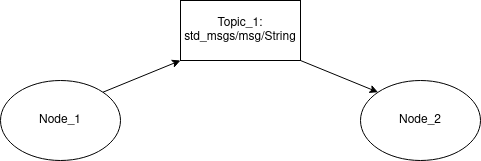
The interaction between the three components is shown in the diagram below. Here, Node_1 publishes to Topic_1 with a message of type std_msgs/msg/String.
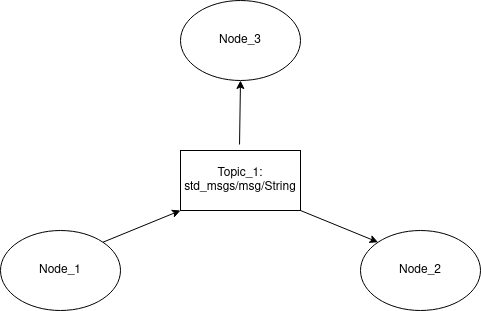
If another node, Node_3, to this network which also uses the messages published in Topic_1 (thus it is a subscriber to Topic_1), it would look like the diagram below. An example of such a network is if Node_1 gathers an image from a sensor and cleans it of noise, and both Node_2 and Node_3 have a use for the same cleaned image.
Packages
The package structure for ROS 1 and 2 are exactly the same. The general structure is shown in the image below with the ROS 2 Humble Hawksbill distribution as reference. (NOTE: the build system for ROS 1 and ROS 2 are different. Former uses catkin, latter uses colcon.)
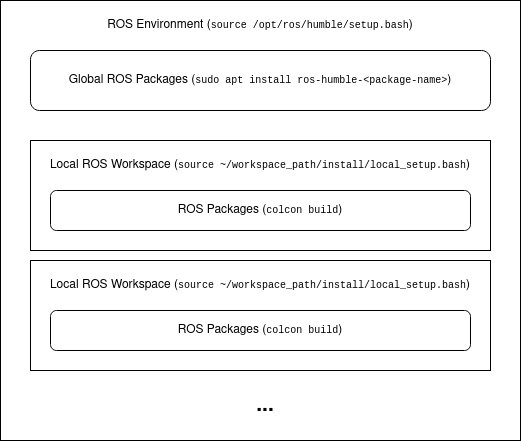
If packages are installed from binaries, they are accessible (the nodes, interfaces, servers, etc.) globally as long as the ROS environment is sourced. On the other hand, if they are built from source, they are done so in isolated workspaced. To access them, they need to be sourced locally from the workspace directory itself.