PX4 - Controls
Flight Stack
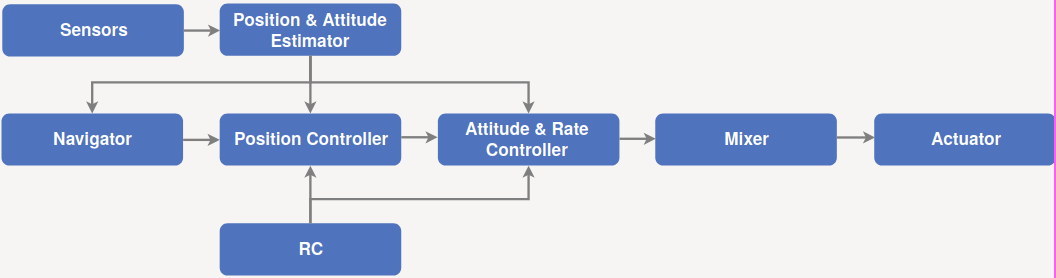
Guidance + Navigation + Control Algorithms for autonomous drones.
Estimator - Takes one or more sensor inputs, combines them, and computes vehicle state.
Controller - Takes setpoint and measurement/estimated state as input.
- It then adjusts value of process variable such that it matches setpoint.
- Output is a correction to eventually reach that setpoint.
- Position controller takes position setpoints, process variable is current estimated position, output is an attitude and thrust setpoint.
Mixer - Takes force commands and translates them into individual motor commands (specific to vehicle type).
Offboard Control Mode
It may be possible to directly control the drone with Offboard Control.
Offboard mode is used for controlling vehicle movement and attitude, by setting:
- position,
- velocity,
- acceleration,
- attitude,
- attitude rates, or
- thrust/torque setpoints.
Requires 2 Hz "proof of life" signal or it will switch out of offboard mode after COM_OF_LOSS_T timeout.
In ROS 2, POL signal is through OffboardControlMode messages. Actual setpoint publish to uORB topics, like TrajectorySetpoint.
OffboardControlMode
The fields are ordered in terms of priority => position takes precedence over velocity and later fields, velocity takes precedence over acceleration, and so on.
| desired control quantity | required estimate | required message |
|---|---|---|
| position (NED) | position | TrajectorySetpoint |
| velocity (NED) | velocity | TrajectorySetpoint |
| acceleration (NED) | velocity | TrajectorySetpoint |
| attitude (FRD) | None | VehicleAttitudeSetpoint |
| body_rate (FRD) | None | VehicleRatesSetpoint |
| thrust and torque (FRD) | None | VehicleAttitudeSetpoint & VehicleTorqueSetpoint |
| direct motors and servos | None | ActuatorMotors & ActuatorServos |
TrajectorySetpoint
Position setpoint (position different from NaN). Non-NaN values of velocity and acceleration are used as feedforward terms for the inner loop controllers.
Velocity setpoint (velocity different from NaN and position set to NaN). Non-NaN values acceleration are used as feedforward terms for the inner loop controllers.
Acceleration setpoint (acceleration different from NaN and position and velocity set to NaN)
All values in NED system at
VehicleAttitudeSetpoint
quaternion q_d + thrust setpoint thrust_body. Non-NaN values of yaw_sp_move_rate are used as feedforward terms expressed in Earth frame and in
Quaternion represents rotation between body FRD (front, right, down) and NED (north, east, down).
Thrust is in FRD and expressed as normalised [-1, 1] values.
VehicleThrustSetpoint + VehicleTorqueSetpoint
xyz for thrust and xyz for torque.
All the values are in the drone body FRD frame and normalized in [-1, 1].
ActuatorMotors + ActuatorServos
All the values normalized in [-1, 1]. For outputs that do not support negative values, negative entries map to NaN.
NaN maps to disarmed.
MAVLink vs ROS 2 Offboard Control
A ROS 2 Library and Interface for External PX4 Flight Modes ## Limitations of MAVLink method - Only a single app can control vehicle. - Requires MAVLink: hard to extend or access other data through this. - Limited integration with failsafe state machine & prearm checks. - Limited set of setpoint types. - Cannot specify displayed mode name in the GCS. ## Modes Component that can send one or more setpoints to control vehicle motion.It is a passive component so it cannot activate other modes.
By itself, it can perform a number of tasks.
A mode can also replace internal PX4 mode.
It will also register with PX4 on startup.
Failsafe and Arming Checks
A mode has a set of requirement flags.
Non-essential falisafes can be temporarily deferred.
Unresponsive or crashed modes can trigger a failsafe.
Mode Executors
Can be used to change modes.
State machines that run through different modes, waiting for them to complete (similar to navigator module).
Only works while it is in charge,
- Owned mode that serves as activation.
- Stays in charge until user/failsafe triggers mode switch.
- Allows multiple executors to coexist.
Is transparent for the user.
Control Interfaces
The mode:
- decides what to control, how and when,
- streams setpoints for controllers to track.
Mode space: What do I want to do? How do I do it? --> Control space: Control options?
ROS 2 mode streams set point for FMU controllers to track.
Example: Offboard with MAVLink API
Create Package
Control scripts for PX4 can be written in C++ or Python and launch as ROS 2 nodes. Here, we will only focus on the Python implementations.
The nodes that will control the drone will be added to a new ROS 2 package inside the pre-existing workspace made here. First, navigate to the workspace root:
# If the following workspace does not exist, refer to the hyperlinked page to create the workspace.
# This is important since packages relevant to controlling the PX4 are installed in this workspace.
cd ~/px4_ws
The source files for packages inside this workspace are in the /src directory. In here, we will create a new package called px4_control_py. This is where all the Python nodes will be added. This package will have a set of dependencies: rclpy, px4_msgs, std_msgs, sensor_msgs, geometry_msgs. This package will use the ament_python build system since the nodes are primarily in Python.
cd ./src
# Create package
ros2 pkg create --build-type ament_python px4_control_py --dependencies rclpy px4_msgs std_msgs sensor_msgs geometry_msgs
This should create a new folder inside the directory. Observe the directory tree:
L px4_ws/
   L build/
       L ...
   L install/
       L ...
   L log/
       L ...
   L src/
       L px4_msgs
       L px4_ros_coms
       L px4_control_py
           L px4_control_py
               L __init__.py
           L resource
           L test
           L package.xml
           L setup.cfg
           L setup.py
Writing a Control Node
The node will be a Python script, and will be located inside px4_control_py package.
touch ~/px4_ws/src/px4_control_py/px4_control_py/px4_control_node.py
Copy and paste the following code inside the script file:
# px4_control_node.py
import rclpy
from rclpy.node import Node
from rclpy.qos import QoSProfile, ReliabilityPolicy, HistoryPolicy, DurabilityPolicy
from px4_msgs.msg import OffboardControlMode, TrajectorySetpoint, VehicleCommand, VehicleLocalPosition, VehicleStatus


class OffboardControl(Node):
"""Node for controlling a vehicle in offboard mode."""

   def __init__(self) -> None:
       super().__init__('offboard_control_node')

       # Configure QoS profile for publishing and subscribing
       qos_profile = QoSProfile(
           reliability=ReliabilityPolicy.BEST_EFFORT,
           durability=DurabilityPolicy.TRANSIENT_LOCAL,
           history=HistoryPolicy.KEEP_LAST,
           depth=1
       )

       # Create publishers
       self.offboard_control_mode_publisher = self.create_publisher(
           OffboardControlMode, '/fmu/in/offboard_control_mode', qos_profile)
       self.trajectory_setpoint_publisher = self.create_publisher(
           TrajectorySetpoint, '/fmu/in/trajectory_setpoint', qos_profile)
       self.vehicle_command_publisher = self.create_publisher(
           VehicleCommand, '/fmu/in/vehicle_command', qos_profile)

       # Create subscribers
       self.vehicle_local_position_subscriber = self.create_subscription(
           VehicleLocalPosition, '/fmu/out/vehicle_local_position', self.vehicle_local_position_callback, qos_profile)
       self.vehicle_status_subscriber = self.create_subscription(
           VehicleStatus, '/fmu/out/vehicle_status', self.vehicle_status_callback, qos_profile)

       # Initialize variables
       self.offboard_setpoint_counter = 0
       self.vehicle_local_position = VehicleLocalPosition()
       self.vehicle_status = VehicleStatus()
       self.takeoff_height = -5.0

       # Create a timer to publish control commands
       self.timer = self.create_timer(0.1, self.timer_callback) # 10Hz frequency

   def vehicle_local_position_callback(self, vehicle_local_position):
       """Callback function for vehicle_local_position topic subscriber."""
       self.vehicle_local_position = vehicle_local_position

   def vehicle_status_callback(self, vehicle_status):
       """Callback function for vehicle_status topic subscriber."""
       self.vehicle_status = vehicle_status

   def arm(self):
       """Send an arm command to the vehicle."""
       self.publish_vehicle_command(
       VehicleCommand.VEHICLE_CMD_COMPONENT_ARM_DISARM, param1=1.0)
       self.get_logger().info('Arm command sent')

   def disarm(self):
       """Send a disarm command to the vehicle."""
       self.publish_vehicle_command(
       VehicleCommand.VEHICLE_CMD_COMPONENT_ARM_DISARM, param1=0.0)
       self.get_logger().info('Disarm command sent')

   def engage_offboard_mode(self):
       """Switch to offboard mode."""
       self.publish_vehicle_command(
       VehicleCommand.VEHICLE_CMD_DO_SET_MODE, param1=1.0, param2=6.0)
       self.get_logger().info("Switching to offboard mode")

   def land(self):
       """Switch to land mode."""
       self.publish_vehicle_command(VehicleCommand.VEHICLE_CMD_NAV_LAND)
       self.get_logger().info("Switching to land mode")

   def publish_offboard_control_heartbeat_signal(self):
       """Publish the offboard control mode."""
       msg = OffboardControlMode()
       msg.position = True
       msg.velocity = False
       msg.acceleration = False
       msg.attitude = False
       msg.body_rate = False
       msg.timestamp = int(self.get_clock().now().nanoseconds / 1000)
       self.offboard_control_mode_publisher.publish(msg)

   def publish_position_setpoint(self, x: float, y: float, z: float):
       """Publish the trajectory setpoint."""
       msg = TrajectorySetpoint()
       msg.position = [x, y, z]
       msg.yaw = 1.57079  # (90 degree)
       msg.timestamp = int(self.get_clock().now().nanoseconds / 1000)
       self.trajectory_setpoint_publisher.publish(msg)
       self.get_logger().info(f"Publishing position setpoints {[x, y, z]}")

   def publish_vehicle_command(self, command, **params) -> None:
       """Publish a vehicle command."""
       msg = VehicleCommand()
       msg.command = command
       msg.param1 = params.get("param1", 0.0)
       msg.param2 = params.get("param2", 0.0)
       msg.param3 = params.get("param3", 0.0)
       msg.param4 = params.get("param4", 0.0)
       msg.param5 = params.get("param5", 0.0)
       msg.param6 = params.get("param6", 0.0)
       msg.param7 = params.get("param7", 0.0)
       msg.target_system = 1
       msg.target_component = 1
       msg.source_system = 1
       msg.source_component = 1
       msg.from_external = True
       msg.timestamp = int(self.get_clock().now().nanoseconds / 1000)
       self.vehicle_command_publisher.publish(msg)

   def timer_callback(self) -> None:
       """Callback function for the timer."""
       self.publish_offboard_control_heartbeat_signal()

       if self.offboard_setpoint_counter == 10:
           self.engage_offboard_mode()
           self.arm()

       if self.vehicle_local_position.z > self.takeoff_height and self.vehicle_status.nav_state == VehicleStatus.NAVIGATION_STATE_OFFBOARD:
           self.publish_position_setpoint(0.0, 0.0, self.takeoff_height)

       elif self.vehicle_local_position.z <= self.takeoff_height:
           self.land()
           exit(0)

       if self.offboard_setpoint_counter < 11:
           self.offboard_setpoint_counter += 1

def main(args=None) -> None:
   print('Starting offboard control node...')
   rclpy.init(args=args)
   offboard_control = OffboardControl()
   rclpy.spin(offboard_control)
   offboard_control.destroy_node()
   rclpy.shutdown()

if __name__ == '__main__':
   try:
       main()
   except Exception as e:
       print(e)
This node will activate offboard control mode and publish a offboard control signal (self.publish_offboard_control_heartbeat_signal()) to the UAV at a 10Hz frequency to ensure that it doesn't leave the offboard control mode.
It will then arm the drone, cause it to takeoff to a height of 5m, and then land safely. Edit the following segment of the code to match your control needs:
def timer_callback(self) -> None:
   """Callback function for the timer."""
   self.publish_offboard_control_heartbeat_signal()

   if self.offboard_setpoint_counter == 10:
       self.engage_offboard_mode()
       self.arm()

   if self.vehicle_local_position.z > self.takeoff_height and self.vehicle_status.nav_state == VehicleStatus.NAVIGATION_STATE_OFFBOARD:
       self.publish_position_setpoint(0.0, 0.0, self.takeoff_height)

   elif self.vehicle_local_position.z <= self.takeoff_height:
       self.land()
       exit(0)

   if self.offboard_setpoint_counter < 11:
       self.offboard_setpoint_counter += 1
Now, all that is left is to build this node so that it can be launched.
Open in a text editor:
~/px4_ws/src/px4_control_py/setup.py
Edit it so that it looks like this:
# setup.py
from setuptools import find_packages, setup

package_name = 'px4_control_py'

setup(
   name=package_name,
   version='0.0.0',
   packages=find_packages(exclude=['test']),
   data_files=[
       ('share/ament_index/resource_index/packages',
       ['resource/' + package_name]),
       ('share/' + package_name, ['package.xml']),
   ],
   install_requires=['setuptools'],
   zip_safe=True,
   maintainer='name',
   maintainer_email='name@todo.todo',
   description='Package description',
   license='License declaration',
   tests_require=['pytest'],
   entry_points={
           'console_scripts': [
           'offboard_control_node = px4_control_py.px4_control_node:main',
       ],
   },
)
Finally, in a new terminal, run the following command:
# Build the new node and source the workspace
cd ~/px4_ws
colcon build
source install/local_setup.bash
Now, we can launch this node alongside our simulation. Run the following sequence of terminal command.
# in Terminal 1
cd ~/PX4-Autopilot
make px4_sitl gz_x500
# in Terminal 2
MicroXRCEAgent udp4 -p 8888
# in Terminal 3
source ~/px4_ws/install/local_setup.bash
ros2 run px4_control_py px4_control_node
Gimbal
May also need to set COM_PREARM_MODE -> "Always"
For gimbal control in PX4 we need to enable it in mavlink shell:
gimbal start
gimbal primary-control 1 1
You also need to assign the required PWM motors to Gimbal (roll, pitch, yaw)
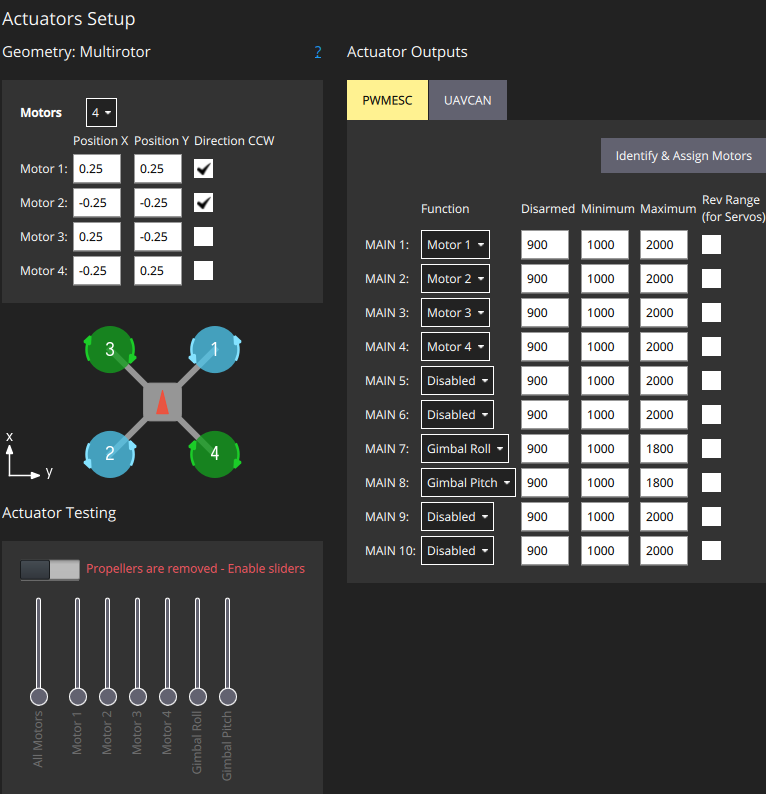
In case the gimbal control status does not sawy Input: Mavlink, you may need to edit params as follows:
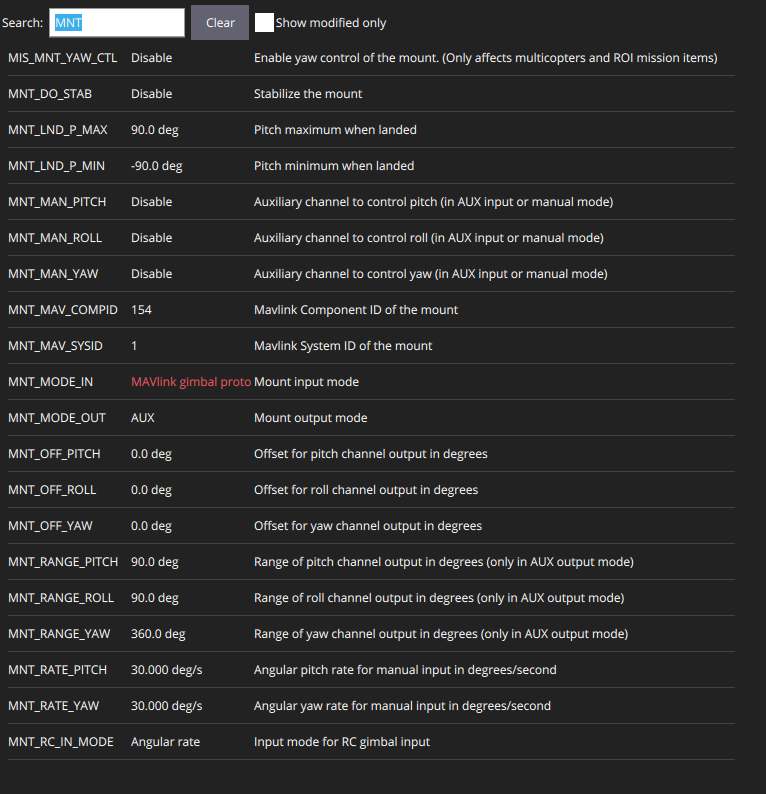
From code, it can work with:
#!/usr/bin/env python3
import asyncio
from mavsdk import System
from mavsdk.action import ActionError
from mavsdk.gimbal import (GimbalError, ControlMode, GimbalMode, SendMode)

CONNECTION_STRING = "tcpout://192.168.200.2:5760"
GIMBAL_ID = 0

async def run():
    drone = System()
    print(f"Connecting to drone at {CONNECTION_STRING}...")
    await drone.connect(system_address=CONNECTION_STRING)

    print("Waiting for drone to connect...")
    async for state in drone.core.connection_state():
        if state.is_connected:
            print("Drone connected!")
            break

    print("Arming the vehicle...")
    try:
        await drone.action.arm()
        print("Vehicle ARMED.")
    except ActionError as e:
        print(f"Arming FAILED: {e}")
        return

    print("--- Starting Gimbal Control Test ---")

    try:
        # --- 1. Take Control ---
        print("Taking primary control of gimbal...")
        await drone.gimbal.take_control(
            gimbal_id=GIMBAL_ID,
            control_mode=ControlMode.PRIMARY
        )
        await asyncio.sleep(1)

        # --- 2. Set Roll Angle (MAIN 7) ---
        await drone.gimbal.set_angles(
            gimbal_id=GIMBAL_ID,
            roll_deg=90.0,
            pitch_deg=0.0,
            yaw_deg=0.0,
            gimbal_mode=GimbalMode.YAW_LOCK,
            send_mode=SendMode.STREAM
        )
        await asyncio.sleep(4)

        # --- 3. Set Pitch Angle (MAIN 8) ---
        await drone.gimbal.set_angles(
            gimbal_id=GIMBAL_ID,
            roll_deg=0.0,
            pitch_deg=90.0,
            yaw_deg=0.0,
            gimbal_mode=GimbalMode.YAW_LOCK,
            send_mode=SendMode.STREAM
        )
        await asyncio.sleep(4)

        print("Resetting gimbal to 0, 0, 0...")
        await drone.gimbal.set_angles(
            gimbal_id=GIMBAL_ID,
            roll_deg=0.0,
            pitch_deg=0.0,
            yaw_deg=0.0,
            gimbal_mode=GimbalMode.YAW_LOCK,
            send_mode=SendMode.STREAM
        )
        await asyncio.sleep(2)

        print("Releasing gimbal control...")
        await drone.gimbal.release_control(gimbal_id=GIMBAL_ID)

    except GimbalError as e:
        print(f"Gimbal command failed: {e}")

    print("--- Test Complete. Disarming. ---")
    await drone.action.disarm()


if __name__ == "__main__":
    asyncio.run(run())