Go - Programming Language
Index
- Example (Go) - Investment Calculator
- Example (Go) - Profit Calculator
- Example (Go) - Bank
- Example (Go) - Bank Packages
- Example (Go) - Pointers
- Example (Go) - Structs
- Example (Go) - Structs and .json
Introduction
About Go
It is an open-source programming language developed and published by Google.
- Focus on simplicity, clarity and scalability
- inspired by languages like Python
- aims to provide a clean, understandable syntax
- High performance and focus on concurrency
- similar to C or C++
- popular for tasks that benefit from multi-threading
- Batteries included
- Go comes with a standard library
- many core features are built-in
- Statically typed
- it is type-safe language
- allows you to catch many errors early
Popular uses of Go include:
- Networking and APIs
- Microservices
- CLI Tools
Installation
- Download the latest version of Go from their website.
- Remove any previous Go installation by deleting the
/usr/local/gofolder (if it exists), then extract the archive you just downloaded into/usr/local, creating a fresh Go tree in/usr/local/go. Do not untar the archive into an existing/usr/local/gotree. This is known to produce broken Go installations.
sudo rm -rf /usr/local/go && tar -C /usr/local -xzf go<version>linux-amd64.tar.gz
- Add
/usr/local/go/binto thePATHenvironment variable. You can do this by adding the following line to your$HOME/.profileor/etc/profile(for a system-wide installation):
export PATH=$PATH:/usr/local/go/bin
Changes made to a profile file may not apply until the next time you log into your computer. To apply the changes immediately, just run the shell commands directly or execute them from the profile using a command such as source $HOME/.profile.
- Verify that you've installed Go by opening a command prompt and typing the following command:
go version
- Confirm that the command prints the installed version of Go.
Simple Program
You can initialise a Go module as follows:
go mod init example.com/first-package
A simple go program can be written as follows:
// app.go
package main
// "package" clause
// main is a special package name as it tells the compiler that it is the
// entry point
// Every project needs to have a main package in place.

import "fmt" // importing the "fmt" package from the standard library

func main() {
   fmt.Print("Hello World")
}
We should also declare a module file and call it go.mod:
module example.com/first-app

go 1.21.6
In terminal, running the following command will then run this code:
$ go run app.go
> Hello World
Packages and Modules
- Go projects are also called modules.
- A package is a collection of similarly themed functions and .go files.
- A module consists of multiplee packages.
Values and Types
Example - Investment Calculator
Example (Go) - Profit Calculator
Basic Types
Go comes with a couple of built-in basic types:
int- a number WITHOUT decimal places (eg. -5, 10, 12, etc.)float64- a number WITH decimal places (eg. -4.2, 10.012, 12.0, etc.)string- a text value c1reated via double quotes or backticks (eg. "Hello World" or `Hello World`)bool-trueorfalse
Limitations of fmt.Scan()
The fmt.Scan() function is a great function for easily fetching & using user input through the command line.
But this function also has an important limitation: You can't (easily) fetch multi-word input values. Fetching text that consists of more than a single word is tricky with this function.
Conditional and for Loops
The for loop in Go comes in a few variations. Some basic ones are:
for i := 0; i < n; i++ {

}
or as an infinite loop, which replaces while in Go:
for {

}
and finally as:
for someCondition {

}
someCondition is an expression that yields a boolean value or variable that contains a boolean value. In that case, the loop will continue to execute the code nested in the loop until the codition/variable yields false.
Files and Packages
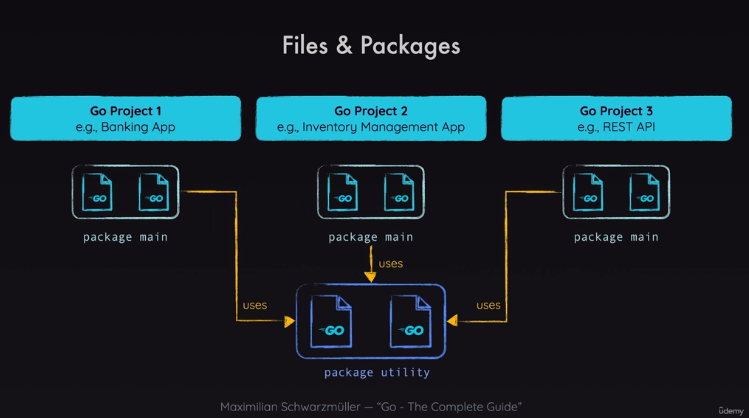
Every package must go into its own subfolder in a project (which you can call the root folder).
Only variables and functions with a capital letter first can be exported from one package and used in another package.
Can find third-party packages in the Go's package library. You can install them by using the following command.
go get <third-party-package-source-link>
If this is called from within a package, then it will add the installed third-party package to the go.mod file. The third-party package, though, is stored globally.
It also adds a go.sum file which contains information about how the current package can access the third-party package. In case the file does not exist, run the below command while inside the root directory.
go get <current-package-source-link>
Pointers
Introduction
Variables that store value addresses instead of values. Any value initialised in code is stored in memory at a respective address. Pointers target the address instead of the value itself. the & operater retrieves the value in the memory address.
Purpose
It avoids unnecessary value copies. By default, Go creates a copy when passing values to functions. It is removed from memory by the garbage collector at the end of a function. For very large and complex values, this may take up too much memory and space unnecessarily. By sending the address to a function, it doesn't create compies, instead the function uses the originally stored value. Hence, only one value is stored in memory.
It directly mutates values. This also means that you don't need to return a copy, as the function can directly operate on the value through the pointer. This leads to less code, but it also means that the code can become less understandable, and result in unexpeceted behaviour as values can be mutated by one function while another is in the middle of a thread.
Routine that removes unused values from memory as they exit the scope of a program
Pointer's Null Value
All values in Go have a so-called "Null Value" i.e. the value that's set as default if no value is assigned to a variable.
For example, the null value of an int is 0. Of a float64 is 0.0. Of a string is "",
For a point, it is nil - a special value built into Go.
nil represents the absence of an address value i.e. a pointer pointing at no address/value in memory.
Structs
Example (Go) - Structs
Example (Go) - Structs and .json
Introduction
Receiver arguments essentially turn functions into methods attached to a particular data type.
When you call a method on an instance of that data type, the receiver argument becomes the instance itself.
type MyInt int

func (m MyInt) IsPositive() bool {
   return m > 0
}

func main() {
   value := MyInt(5)
   result := value.IsPositive() // true
}
Receiver arguments promote code organization by grouping functionalities alongside the data they operate on.
They improve readability by allowing you to call methods with a dot notation (e.g. myInt.IsPositive()).
Types
- Value receivers - The method operates on a copy of the value. This is useful when you don't want to modify the original data.
- Pointer receivers - The method operates on the original data pointed to by the receiver. This is necessary when you want to make changes to the data itself.
Interfaces
Introduction
Interfaces are a way to define a contract of a behaviour. Interface type declares a set of methods that a concrete type must implement to be considered as adhereing to that interface. It is like a blueprint for what a type should be able to do.
Key Points
- Implicit Implementation - There's no need to explicitly declare that a type implements an interface. If the type has all the necessary methods, Go automatically treats it as fulfilling the interface.
- Type Flexibility - A variable declared with an interface type can hold values of any concrete type that implements the interface. This is the essence of polymorphism in Go.
- Decoupling - Using interfaces helps decouple different parts of your code. Functions and components can work with abstractions (interfaces) rather than specific implementations. This makes code more adaptable to change.
Example
type Shaper interface {
   Area() float64
}

type Rectangle struct {
   width, height float64
}

func (r Rectangle) Area() float64 {
   return r.width * r.height
}

type Circle struct {
   radius float64
}

func (c Circle) Area() float64 {
   return math.Pi * c.radius * c.radius
}
- We define a
Shaperinterface. Any type with anArea()method returning afloat64will fulfill it. RectangleandCirclestructs both implement theShaperinterface.
Now a function that accepts Shaper can work with both rectangles and circles:
func calculateTotalArea(shapes []Shaper) float64 {
   var total float64
   for _, shape := range shapes {
       total += shape.Area()
   }
   return total
}
Empty Interface (interface{})
Go has a special interface called the empty interface: interface{}. It has no methods, meaning all types implicitly implement it. This is useful for generic functions that need to work with values of unknown types.
Generics
Using the empty interface can often cause functions to become quite verbose:
func add(a, b interface{}) interface{} {
    aInt, aIsInt := a.(int)
    bInt, bIsInt := b.(int)
    if aIsInt && bIsInt {
        return aInt + bInt
    }

    aFloat, aIsFloat := a.(float64)
    bFloat, bIsFloat := b.(float64)
    if aIsFloat && bIsFloat {
        return aFloat + bFloat
    }

    aString, aIsString := a.(string)
    bString, bIsString := b.(string)
    if aIsString && bIsString {
        return aString + bString
    }
}
This can be fixed by using generics:
func add[T int|float64|string](a, b T) T {
    return a + b
}
This implies that T can assume any value type assigning in the piped list (i.e. int, float or string).
Why Interfaces Matter
- Abstraction - They hide implementation details, allowing you to focus on what a type can do rather than how it does it.
- Polymorphism - You can write functions and methods that operate on common interfaces, making them reusable with different types.
- Testability - Interfaces make it easier to substitute real implementations with mock objects for testing.
Arrays and Slices
Slicing an array is performed with square brackets:
prices := [4]float64{10.99, 9.99, 45.99, 20.00}
featuredPrices := prices[1:3]
highlightedPrices := featuredPrices[:1]
The interesting thing about Go is that slices still remember information from the array it came from. For instance, if I am to reslice from above:
highlightedPrices = highlightedPrices[:3]
This will not throw an error /because/ highlightedPrices remembers information from featuredPrices. And since the slice is from the beginning of the array, it remembers everything beyond the sliced limit until the actual limit of the parent array.
Operations with Arrays
Appending
prices := [4]float64{10.99, 9.99, 45.99, 20.00}
prices = append(prices, 30.00)
Popping
prices = append(prices[:2], prices[3:]...)
Initialise with make
newArray = make([]string, length, capacity)
Maps
Maps are key-value paired data structures like dictionaries or hash tables.
Declaring and Initialising
make Method
myMap := make(map[keyType]valueType, allocKeySpace)
Literal Syntax
myMap := map[string]int{
    "Alice": 23,
    "Bob":   30,
}
Operations with Maps
Adding/Updating Elements
myMap[key] = value
Retrieving Values
value, exists := myMap[key]
Deleting Elements
delete(myMap, key)
Iterating over a Map
for key, value := range myMap {
    fmt.Println("Key:", key, "Value:", value)
}
The order of iteration over a map is not always guaranteed.